LLM Agents: A Gentle Introduction
A developer-friendly introduction to LLM agents: what they are, how they run, what tools and memory do, and where to start.
When developers first hear "AI agent" or "agentic AI," a fair question follows: how is this different from sending a prompt to ChatGPT and getting a response back?
A raw language model call is a single round trip. You send input, the model returns output, and the exchange ends. By itself, the model cannot decide to search your docs, call your database, run a test, inspect a file, or check whether its answer worked.
An agent extends that single call into a loop. The model can decide what to do next, call a tool, read the result, update its context, and keep going until the task is finished, blocked, or stopped by a limit.
The simplest way to say it is:
An LLM agent is a language model inside a loop, connected to tools, memory, and an environment.
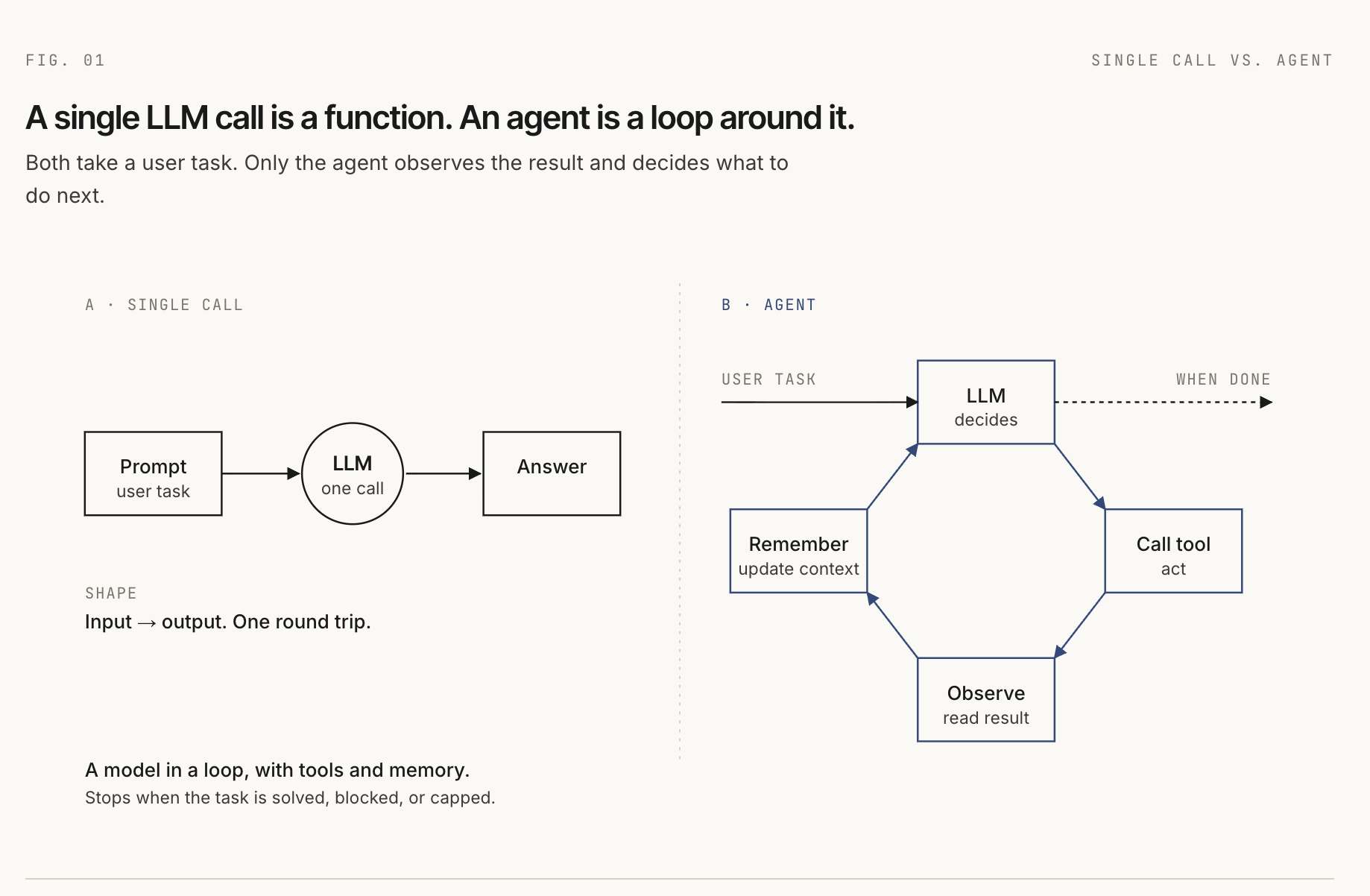
At every step, the model still only sees input. That input may contain system instructions, user messages, tool definitions, memory snippets, prior tool results, and retrieved documents. In that practical sense, everything the model sees is a prompt. The engineering work is deciding what should be assembled into that prompt at each step.
What is an AI agent?
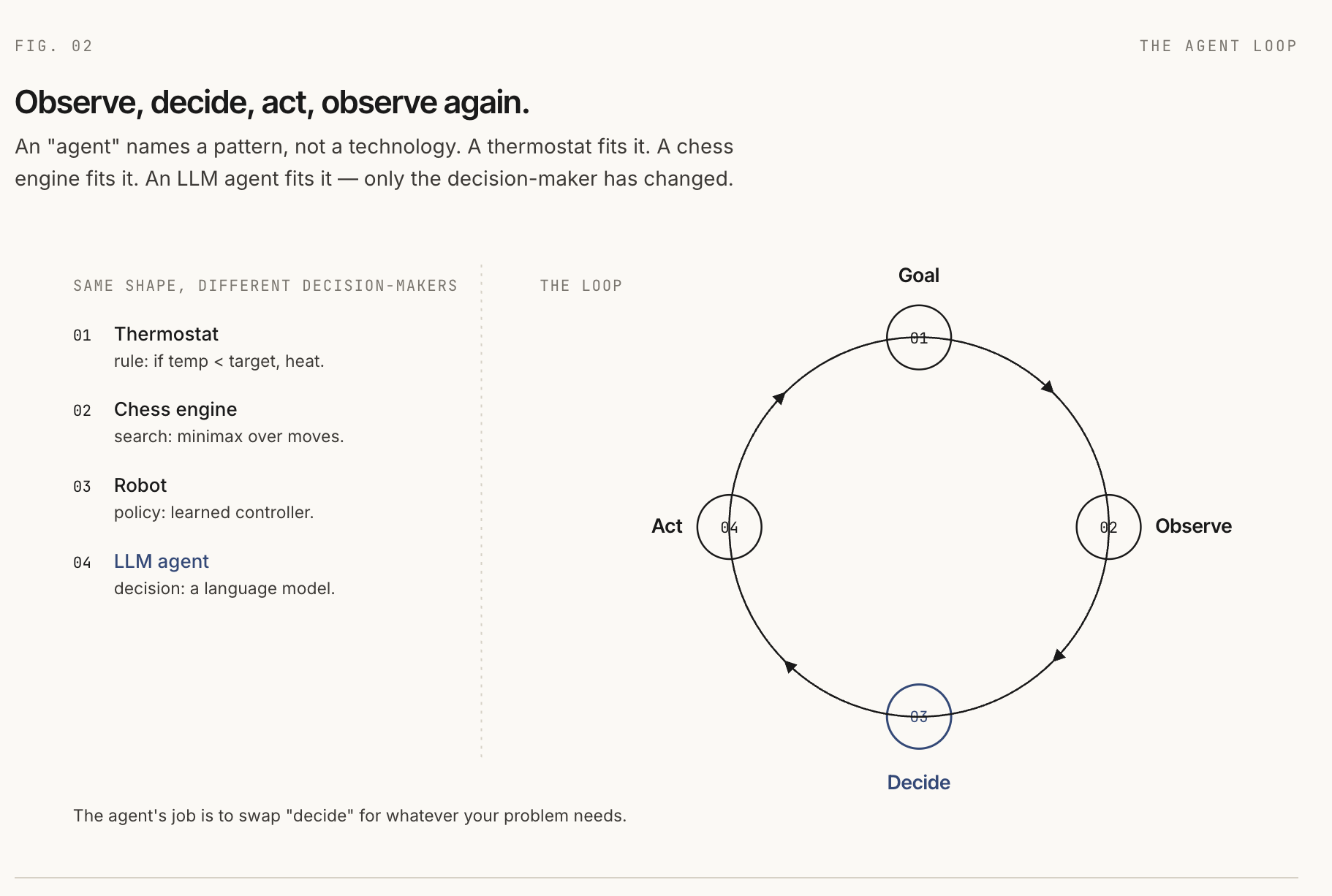
Agents are older than LLMs. In classical AI, an agent is something that perceives an environment and acts on it to achieve a goal. That definition covers simple systems such as thermostats and complex systems such as chess engines, robots, and reinforcement learning policies.
What they share is a shape:
- There is a goal.
- There is an environment.
- The agent observes something about that environment.
- The agent chooses an action.
- The environment changes or returns feedback.
An LLM-based agent fits the same shape. The user's task is the goal. The model is the decision-maker. Tools are actions. Tool results are observations. The environment is whatever the agent can act on: a browser, a codebase, a database, a calendar, an API, or a sandbox.
So "agent" does not name one specific technology. It names a pattern: observe, decide, act, observe again.
LLMs as the brain of the agent
For a long time, the hard part was the policy: the logic that maps an observation to the next action. Hand-written rules were brittle. Search systems could explode in complexity. Learned policies often needed task-specific data and training.
LLMs changed the bottleneck. A modern instruction-following model can read a natural-language goal, inspect a list of available tools, choose a tool, fill in structured arguments, and interpret the result. That does not make the model the whole agent, but it makes the model a useful decision engine inside the agent.
Three capabilities made this practical:
- Instruction following: you can describe behavior in prose.
- Structured output: the model can return JSON or function calls the harness can route.
- Long context: the model can receive enough task history, tool output, and retrieved context to continue across multiple steps.
Reasoning improved sharply too, and that is where most agent discussions begin.
The capabilities of an agent
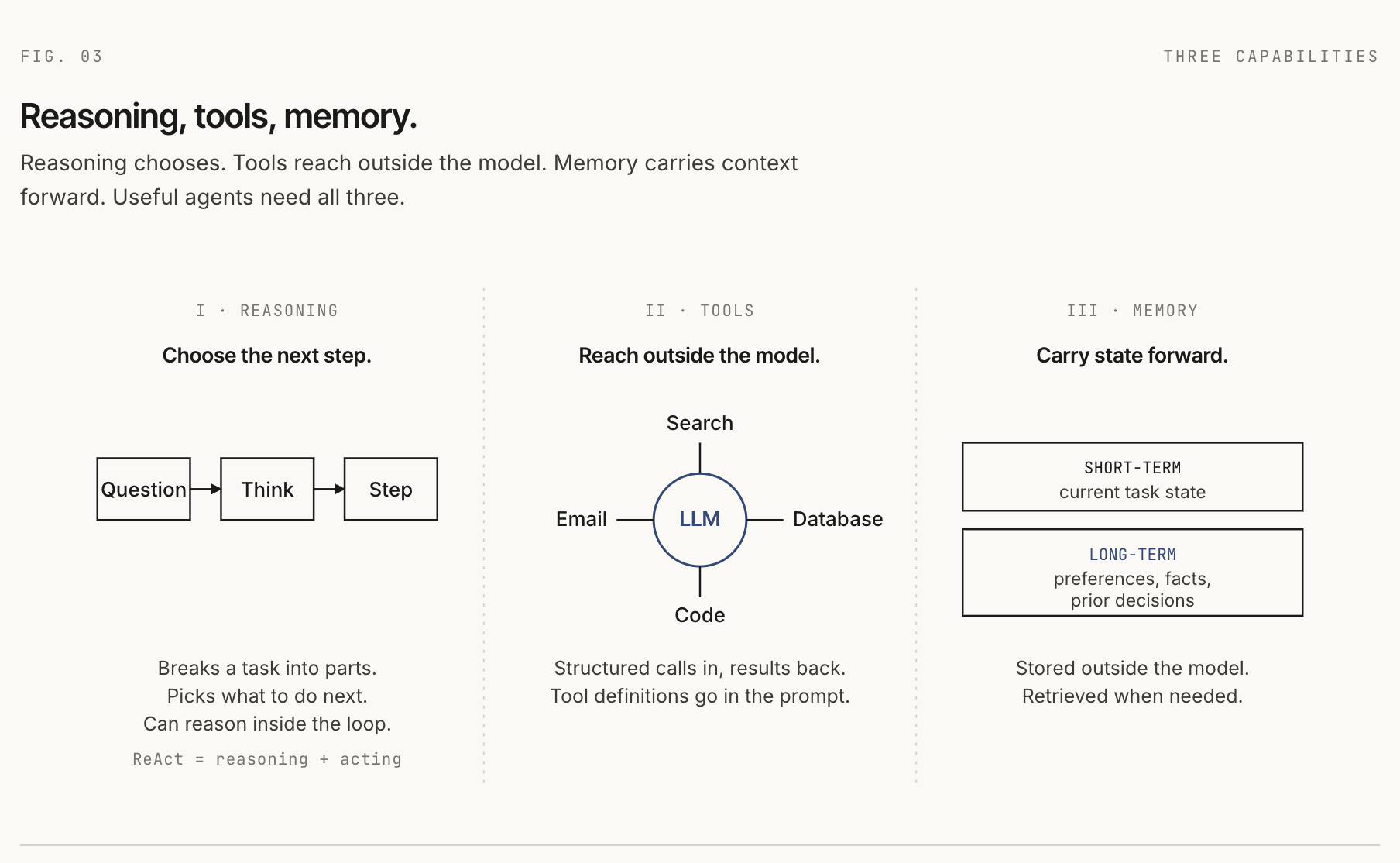
Three capabilities sit at the core of most useful agents: reasoning, tools, and memory.
Reasoning
Chain-of-thought prompting was an eye-opening moment. Before it, many developers did not have a practical reason to believe that asking a model to show intermediate steps could improve difficult answers. The model was not given a new tool or a new training run. The prompt simply gave it room to work through the problem.
User: A bakery has 23 cupcakes. They sell 8 in the morning
and bake 12 more in the afternoon. How many at the end of the day?

Prompt addition: Think step by step.

Model:
Start with 23.
After selling 8: 23 - 8 = 15.
After baking 12: 15 + 12 = 27.
Answer: 27.
The safer way to phrase the lesson is: no task-specific training was needed. The reasoning behavior was latent enough that a better prompt could surface it.
ReAct extended that idea into an agent loop. Instead of only writing intermediate reasoning, the model alternates between reasoning and actions:
Task: What is the population of the capital of Slovakia?

Thought: I need the capital first.
Action: search("capital of Slovakia")
Observation: The capital of Slovakia is Bratislava.

Thought: Now I need Bratislava's population.
Action: search("Bratislava population")
Observation: Approximately 475,000 residents.

Final: Approximately 475,000.
ReAct mattered because it grounded reasoning in feedback from the world. The model could think, act, observe, and revise.
The newer shift is the reasoning model. For a gentle introduction, you can think of these as "thinking models": models trained to spend more computation on hard problems before producing a final answer. The standard terms are reasoning models and test-time compute. OpenAI's o1 and DeepSeek-R1 made this pattern widely visible.
The important point for agent builders is that these ideas stack. A reasoning model can run inside a ReAct-style loop. The model handles hard local reasoning; the loop handles tools, observations, and grounding.
Tools
Tools are how an agent reaches outside the model. A tool might search documents, query a database, send an email, inspect a GitHub issue, run code, or control a browser.
The model learns which tools exist because tool names, descriptions, and argument schemas are included in the model input.
You have access to these tools:

search_docs(query: string, top_k: number)
  Search the knowledge base for documents matching a query.

send_email(to: string, subject: string, body: string)
  Send an email to a recipient.
When the model chooses a tool, it produces structured output. The harness reads that output, runs the actual function in the environment, and feeds the result back as the next observation.
{
  "tool": "search_docs",
  "arguments": {
    "query": "Q3 report",
    "top_k": 5
  }
}
Early agent systems used many custom wrappers. Every framework had its own tool format, and every provider had a slightly different function-calling shape. The Model Context Protocol, released by Anthropic in November 2024, standardizes the client-server boundary for tools and resources. Once an MCP server exists, an agent client can discover and call its tools without a one-off integration for that specific provider.
There is still engineering work. Someone has to expose the useful API as an MCP server, handle authentication, define permissions, and decide what tool outputs should look like. MCP reduces integration friction; it does not remove design work.
As tool catalogs grow, another problem appears: you cannot always put every tool definition into the model context. Tool search solves this by loading only the relevant tools on demand. Claude Code's tool-search documentation is a good practical example of this pattern.
There is also CodeAct, where the model writes executable code instead of emitting one JSON tool call at a time. That can be powerful because code can use variables, loops, and multiple API calls in one action. It also raises the bar for sandboxing and safety.
Memory
The model does not remember previous calls by itself. Each call starts from the input it receives. If the agent "remembers" something, the harness or a tool has put that memory back into the model context.
Short-term memory is the running state of the current task: messages, prior tool calls, prior observations, scratchpad notes, and partial outputs.
Long-term memory persists across tasks: user preferences, project facts, prior decisions, or stored documents. It usually lives outside the model in a database, vector store, file, or application backend.
The hard part is not only storage. The hard part is deciding what to save, when to retrieve it, and how much to put back into context. Too little memory makes the agent forgetful. Too much memory floods the prompt with noise.
The anatomy of a running agent
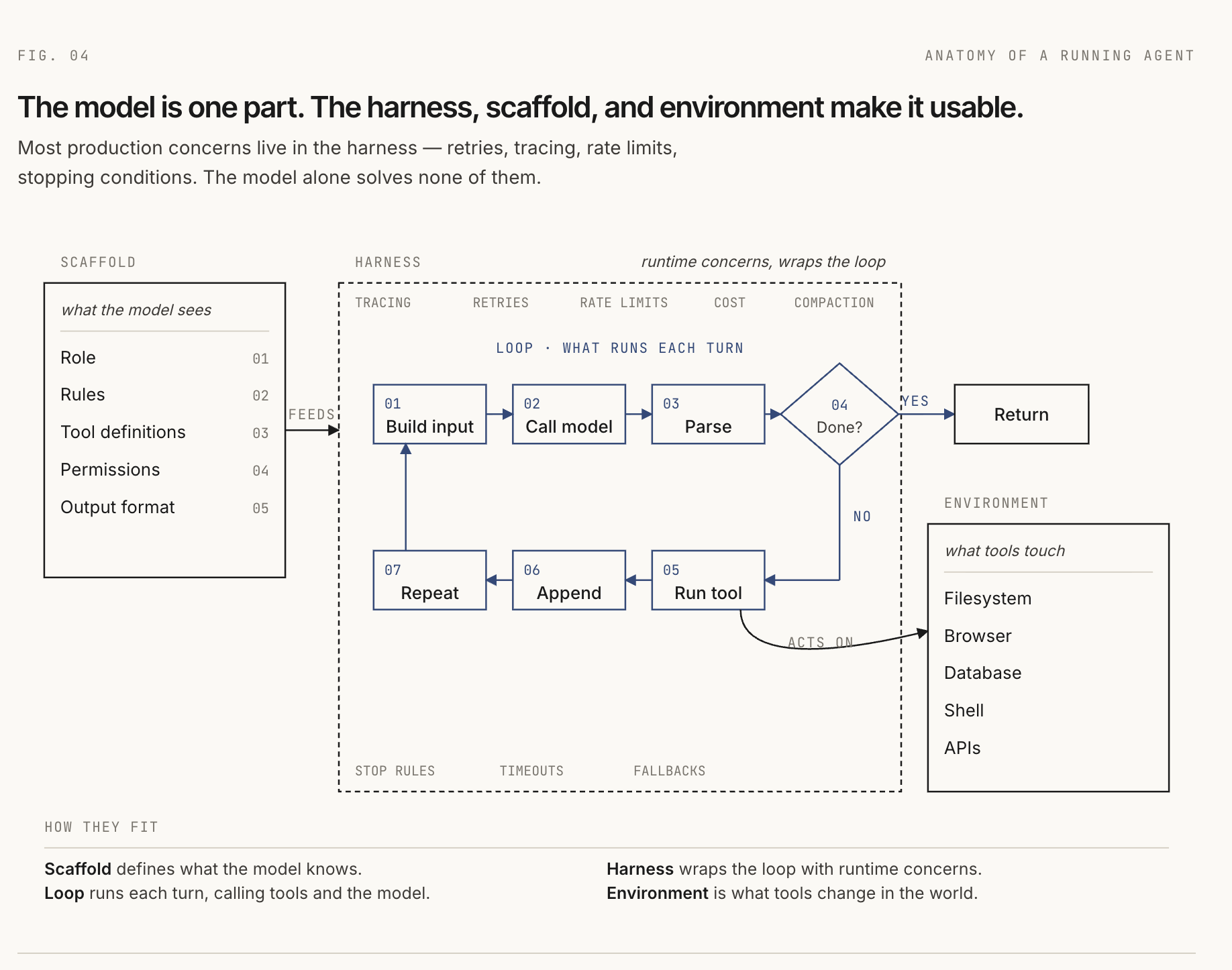
The capabilities explain what an agent can do. The anatomy explains how it runs.
The loop
The core loop is simple:
- Build the model input.
- Call the model.
- Parse the model response.
- If the model is done, return the answer.
- If the model requested a tool, run the tool.
- Add the result to context.
- Repeat until done, blocked, or out of budget.
The harness
The harness is the runtime code that drives that loop.
function runAgent(task, scaffold, environment) {
  let context = buildInitialContext(scaffold, task);

  for (let step = 0; step < maxSteps; step++) {
    const response = model.call(context);

    if (response.isComplete()) {
      return response.answer;
    }

    const toolCall = response.toolCall;
    const result = environment.execute(toolCall);

    context = appendToContext(context, response, result);
    context = compactIfNeeded(context);
  }

  return timedOut();
}
Most production concerns live in the harness: tracing, retries, rate limits, cost tracking, malformed output recovery, context compaction, approval gates, and stopping conditions. A demo can survive with a weak harness. A production agent usually cannot.
The environment
The environment is the world the agent acts on. For a coding agent, that might be a repository, shell, filesystem, test runner, and browser. For a support agent, it might be a CRM, ticketing system, knowledge base, and email API.
Two questions matter:
- Is the action deterministic? Running a local parser is easier to reason about than searching the web.
- Is the action reversible? Editing a sandboxed file can be undone. Sending money or deleting production data cannot.
The less deterministic and less reversible the environment is, the more guardrails you need: narrow permissions, dry-run modes, human approval, audit logs, and rollback plans.
The instruction scaffold
The terms scaffold and harness are not fully standardized. People often use agent scaffolding and agent harness interchangeably to mean "the software around the model." That is fine in casual conversation, but the distinction is useful when you are building.
In this article, the scaffold is the structure available before the agent runs: role, behavioral rules, tool definitions, permissions, memory conventions, and output formats.
[role]
You are a research assistant for software developers.

[rules]
- Cite sources.
- Search before answering if the answer may have changed.
- Ask before taking irreversible actions.

[tools]
- search_docs(query, top_k)
- fetch_url(url)

[output format]
Respond in markdown with source links.
The harness assembles the scaffold with runtime context: the current task, today's date, retrieved memory, previous tool results, and anything else the model needs for the next step.
Everything the model sees is a prompt
This is the unifying idea. The model does not see your database connection, your app server, your vector store, or your tool registry directly. It sees the input the harness gives it.
That input is systematically assembled context. It may contain static instructions from the scaffold, dynamic facts from the environment, retrieved memory, tool schemas, and observations from previous steps. To the model, all of that is the prompt.
If the agent chooses the wrong next action, the bug is often in this assembled prompt: missing tool description, unclear instruction, stale memory, noisy retrieval, ambiguous output format, or a tool result that lost the important detail.
This is why context engineering is becoming a core agent skill. You are not just "writing prompts." You are designing the information surface the model uses to act.
Architectural patterns
Once you understand a single agent, the next question is how to compose systems.
A workflow is a fixed sequence of steps. Your code decides what happens next. The model may summarize, classify, extract, or generate at each step, but the path is known ahead of time.
A single agent is one model-driven loop with access to tools. The model decides the next action based on the current context. This is the best starting point when the task path is uncertain.
A multi-agent system uses multiple agents, often with specialized roles. This can help when work naturally splits across domains, but it also adds communication overhead, coordination failures, and harder debugging.
An orchestrator-worker pattern is the most common useful multi-agent shape. One orchestrator breaks the task into subtasks and delegates to workers. Mechanically, calling a worker agent is just a tool call where the implementation happens to be another agent.
The honest guidance is boring and useful: start with a workflow when the steps are predictable. Use a single agent when the path is genuinely uncertain. Reach for multi-agent systems only when you have evidence that one agent with better tools is not enough.
Customizing agents
The cheapest way to change an agent is to change the prompt: improve the role, tighten the output format, clarify tool descriptions, add examples, or change what memory gets injected.
When manual prompting plateaus, three stronger options show up.
Prompt optimization treats the prompt as something that can be searched and tuned against a metric. DSPy is the clearest example: you define a language-model program, provide a metric and examples, and let an optimizer improve instructions or demonstrations.
Supervised fine-tuning trains a model on examples of the behavior you want. It is useful when you need a stable format, domain-specific language, or a smaller model to imitate a larger one. It also gives you a model artifact to maintain.
Reinforcement learning with verifiable rewards is useful when correctness can be checked automatically: math answers, code that passes tests, structured outputs that parse, or tasks with clear success signals. For most application developers, this is something you consume by choosing a reasoning model, not something you run yourself.
The order matters. Start with better context. Add prompt optimization when you have a metric. Consider SFT when prompting cannot reliably produce the behavior. Treat RL with verifiable rewards as advanced training infrastructure.
Frameworks at a glance
A framework is a set of opinions about harness, scaffold, tools, state, and deployment.
LangChain and LangGraph are widely used in the Python and JavaScript ecosystem. LangChain gives agent and tool abstractions; LangGraph gives an explicit graph runtime with state, persistence, interrupts, and human-in-the-loop patterns.
Google ADK is a code-first framework for developing and deploying agents. It is optimized for Gemini and the Google ecosystem, but the official docs describe it as model-agnostic and deployment-agnostic.
BeeAI Framework is an open-source framework for building production-grade multi-agent systems with provider-agnostic model support and memory strategies.
Agent Stack, formerly BeeAI Platform, is deployment and runtime infrastructure. It helps run agents as services, with a web UI, CLI, LLM routing, storage, document extraction, secrets, OAuth, MCP integrations, and A2A compatibility.
DSPy is different from graph frameworks. It treats prompts and LM calls as parts of a typed program that can be optimized against examples and metrics.
Do not pick a framework because it is popular. Pick it because its mental model matches the problem you are solving.
Where to start
The smallest useful project is a ReAct-style agent with one real tool.
- Pick a model with function calling or structured output.
- Define one tool that does something real.
- Write the loop yourself.
- Log every model input, tool call, observation, and final answer.
- Add a stopping condition and a step budget.
- Add one small eval set: five to ten tasks you expect it to handle.
- Only then move the same idea into a framework.
You will hit the real problems quickly. The model will ask for a tool that does not exist. A tool will fail. Context will get noisy. The agent will repeat itself. Each failure teaches something specific about harness design, scaffold writing, tool design, memory, or context engineering.
That is the durable lesson: an agent is not just an LLM. It is a model inside a runtime loop, shaped by a scaffold, connected to tools, operating in an environment, and fed by carefully assembled context.
Further reading
- Chain-of-Thought Prompting Elicits Reasoning in Large Language Models
- ReAct: Synergizing Reasoning and Acting in Language Models
- OpenAI: Learning to reason with LLMs
- Anthropic: Introducing the Model Context Protocol
- Anthropic: Building effective agents
- Claude Code docs: Tool search
- Google Cloud: Agent Development Kit overview
- Agent Stack documentation
- DSPy documentation
comments