Stop Hand-Writing and Brute-Forcing Prompts: Use DSPy Instead
DSPy turns the prompt from text you hand-edit into something you compile: declare the inputs and outputs, define a metric, and let an optimizer do the tuning.
Most production LLM calls come with the same overhead: a prompt template with formatting rules, a JSON parser with retry logic, a reasoning pattern built from scratch, and quality checks that amount to reading outputs and hoping they look right. Switch models and every prompt needs manual re-tuning. Collect better eval data and there is no systematic way to use it.
DSPy is a Python framework that removes that overhead. The shift it asks for is the one a compiler asks for: you describe what you want computed and let something else decide how to express it. You declare what a call takes and what it returns, and DSPy writes the prompt, parses the reply, and tunes the wording against data you supply. The prompt stops being a file you maintain and becomes an output of your system.
It works in three steps. Declare the task by its inputs and outputs and DSPy builds the prompt, calls the model, and hands back typed values. Wrap the task in a module to get a proven prompting technique without building it yourself. Optimize against your own data, so the prompt is tuned by a metric instead of by taste. One example runs through all three: generating a professional email.
1. Declare the task, not the prompt
Say you need to write a professional email about a topic, in a given tone. Without DSPy, the code looks something like this:
def generate_email(topic: str, tone: str) -> dict:
    prompt = f"""Write a professional email.

Topic: {topic}
Tone: {tone}

Return your response as valid JSON with no markdown formatting:
{{ "subject": "...", "body": "..." }}

Do not include backticks. Do not add text before or after the JSON."""

    for attempt in range(3):
        response = client.chat.completions.create(
            model="gpt-4o",
            messages=[{"role": "user", "content": prompt}],
        )
        text = response.choices[0].message.content.strip()
        if text.startswith("```"):
            text = text.split("\n", 1)[1].rsplit("```", 1)[0]
        try:
            result = json.loads(text)
            assert "subject" in result and "body" in result
            return result
        except (json.JSONDecodeError, AssertionError):
            if attempt == 2: raise
The intent is "generate an email," but most of the code is plumbing: formatting instructions, JSON escaping, a retry loop, markdown fence stripping, and manual validation. Remove any of those layers and the function breaks in production.
In DSPy you declare that intent instead of writing it out, and the declaration has a name: a Signature. You subclass dspy.Signature, put one sentence in the docstring saying what the task is, and list the data going in and the data coming out. Nothing else. There is no prompt in it anywhere.
import dspy

class WriteEmail(dspy.Signature):
    """Write a professional email about the given topic, in the given tone."""

    topic: str = dspy.InputField(desc="what the email is about")
    tone: str = dspy.InputField(desc="e.g. formal, friendly, urgent")

    subject: str = dspy.OutputField(desc="Email subject line")
    body: str = dspy.OutputField(desc="Full email body")

email = dspy.Predict(WriteEmail)
result = email(topic="Following up on a job application", tone="formal")
# result.subject and result.body are typed strings
Notice what is not in there. An earlier version of this signature also took a sender and a recipient, and both had to go. The sender was the same string on every call, which makes it configuration rather than data, and the recipient was a name the model knew nothing else about, so it produced greetings and invented context instead of a better email. An input field earns its place by varying between calls and changing what a good answer looks like.
That is the whole contract: what goes in, what comes out, and what each field means. DSPy handles prompt construction, output parsing, type coercion, and retries. The result comes back as a typed object, so you access result.subject and result.body directly with no JSON parsing or extraction logic. The docstring is not just a comment either. DSPy uses it as the core instruction when building the prompt, so intent and contract live in the same place.
When no field needs explaining, the same signature fits in a string:
email = dspy.Predict("topic, tone -> subject, body")

print(email.signature.instructions)
# Given the fields `topic`, `tone`, produce the fields `subject`, `body`.

# annotate types when you need them
triage = dspy.Predict("topic, tone -> subject, body, needs_reply: bool")
That is the same two inputs and two outputs as the class, minus the docstring and the field descriptions. DSPy infers an instruction from the field names alone, which is the line printed above, and everything else behaves identically. Start with the string while you are working out the shape of a call, and move to the class when a field needs a description or a type worth naming, the way tone does.
If you have worked with Pydantic for API validation, the mental model is the same: declare the shape, let the framework handle parsing. Signature fields are Pydantic fields under the hood, so when you need more complex output structures, you can type them with full Pydantic models and DSPy will parse and validate automatically.
2. Reuse a proven prompting technique instead of rebuilding it
A Signature defines what goes in and what comes out. A Module defines how the model reasons about it. The prompting techniques that papers and blog posts describe are already implemented here, so you pick one rather than reconstructing it from a write-up. Each is a one-line wrapper that works with any Signature:
# Direct call, no reasoning
email = dspy.Predict(WriteEmail)

# Think step-by-step before writing
email = dspy.ChainOfThought(WriteEmail)

# Reason, use tools (e.g. look up the policy it should cite), then write
email = dspy.ReAct(WriteEmail, tools=[search_handbook])
Swapping dspy.Predict for dspy.ChainOfThought is a one-word change. No prompt rewrite, no new parsing logic. The Signature and calling code stay the same. Only the reasoning wrapper changes.
The practical effect is fast prototyping. You start with dspy.Predict to get the pipeline working, then upgrade selectively. The email writer might get ChainOfThought because its outputs are too generic. A review step might get Refine because first drafts are inconsistent. If you have ever implemented chain-of-thought by prepending "Let's think step by step" to a prompt, you have already done what dspy.ChainOfThought does, except DSPy ships it as a tested, composable primitive.
When your task does not match any of them, you write your own. A module is a class with a forward() method, and inside it you call other modules, so a multi-step technique is just composition. Draft the email, then revise it:
class DraftAndRevise(dspy.Module):
    def __init__(self):
        super().__init__()
        self.draft = dspy.ChainOfThought(WriteEmail)
        self.revise = dspy.ChainOfThought("draft_subject, draft_body -> subject, body")

    def forward(self, **inputs):
        draft = self.draft(**inputs)
        return self.revise(draft_subject=draft.subject, draft_body=draft.body)
Two rules are worth knowing here. Field names have to be distinct across a signature's inputs and outputs, which is why the second step takes draft_subject rather than reusing subject. And the composed class is itself a module, so it can be wrapped, nested, and handed to an optimizer, which then tunes both steps as one program.
3. Optimize against your own data
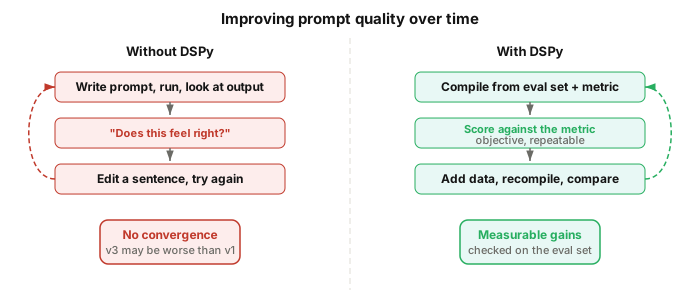
The standard prompt engineering workflow looks like this: write a prompt, run it, look at the outputs, edit a sentence, run it again, check if it looks better. There is no metric. The feedback loop is "does this feel right?" That is craft, not engineering.
DSPy adds a compilation step. You define a metric, build an eval set, and hand both to an optimizer that searches for the best prompt and few-shot examples. The eval set can be as simple as a CSV file with one column per input field and one row per test case:
import re
import pandas as pd

# "[Your Name]", "[Company]" — the gap a model leaves when it does not
# know something and will not say so.
PLACEHOLDER = re.compile(r"\[[^\]\n]{2,40}\]")
CHECKS = 4

# Define what "good" means, and say why when it is not
def email_quality(example, prediction, trace=None, pred_name=None, pred_trace=None):
    problems = []
    if len(prediction.subject) > 60:
        problems.append(f"Subject is {len(prediction.subject)} characters. Keep it under 60.")
    if example.tone.lower() in prediction.body.lower():
        problems.append(f"The body names the tone ('{example.tone}') instead of reading that way.")
    if len(prediction.body) < 40:
        problems.append("The body is too short to be a real email.")
    if holes := PLACEHOLDER.findall(prediction.body):
        problems.append(
            f"The body leaves blanks for someone to fill in ({', '.join(holes[:3])}). "
            "Write around anything you were not given instead of inventing a slot for it."
        )

    return dspy.Prediction(
        score=1.0 - len(problems) / CHECKS,
        feedback=" ".join(problems) or None,
    )

# Load eval set from a spreadsheet
df = pd.read_csv("email_examples.csv")
eval_set = [
    dspy.Example(**row).with_inputs("topic", "tone")
    for row in df.to_dict("records")
]

# Score the baseline before tuning anything
email = dspy.ChainOfThought(WriteEmail)
baseline = dspy.Evaluate(devset=eval_set, metric=email_quality, num_threads=4)(email)

# Then compile
optimizer = dspy.GEPA(
    metric=email_quality,
    auto="light",  # search budget: light, medium, or heavy
    reflection_lm=dspy.LM("openai/gpt-5", temperature=1.0, max_tokens=32000),
    num_threads=4,
)
compiled_email = optimizer.compile(email, trainset=eval_set)
compiled_email.save("optimized_email_writer.json")
Run the baseline first. Without a number from before the optimizer touched anything, a compiled program is just a different prompt rather than a better one. The same metric does both jobs: dspy.Evaluate reads the score off it, and GEPA reads the score and the feedback.
Two details make GEPA work. The metric returns a score and a sentence explaining it, because GEPA hands that text to a second model that rewrites the instruction. A bare number says something is wrong; the sentence says what to change. That reflection model should be a strong one even when the task itself runs on something cheaper, since it is called once per proposal rather than once per example.
The fourth check is there because of what weaker models actually do. Run this against a small local model and the emails come back full of [Company Name], [position title], [Your Phone Number]: rather than write around a detail it was never given, the model leaves a slot for a human to fill. It reads as a competent draft and is useless as an email. That failure is invisible to a metric that only counts characters, which is the general lesson about metrics. Write down the specific way your outputs go wrong, not the way quality sounds in the abstract, and each new failure you meet becomes another few lines here rather than another round of squinting.
What you saved is the artifact you ship. In production you load the compiled program and call that, not the module you started with, because the module has none of the tuning in it:
email = dspy.ChainOfThought(WriteEmail)
email.load("optimized_email_writer.json")

result = email(topic="Following up on a job application", tone="formal")
The saved file is JSON, holding the tuned instruction and the selected few-shot examples, so it diffs in a pull request and versions alongside your code. When new edge cases surface (emails that are too long, wrong tone for the audience), you add a row to the spreadsheet and recompile. The Signature and Module stay the same. Only the compiled prompt changes, in a direction that is measurable.
This is the answer to "I can just write good prompts." You can. But you cannot systematically improve them with new data. DSPy makes that process repeatable: expand the eval set, recompile, compare the metrics.
What DSPy buys you when a new model ships
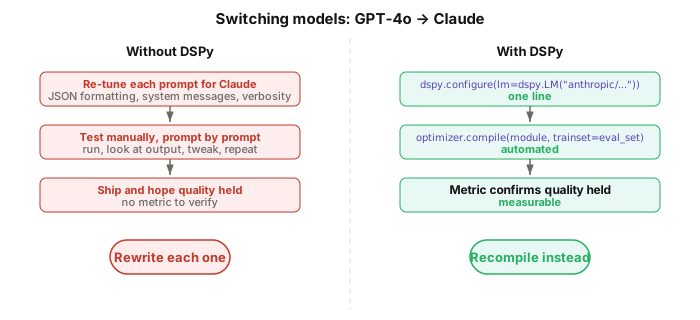
The steps buy you something that is hard to get any other way. Without DSPy, every prompt is written against one model's tendencies. Models differ in how they handle formatting, system messages, and reasoning, so "try the model that shipped last week" becomes "re-tune every prompt for it." In a system with ten LLM calls, that is ten prompts to rewrite and ten sets of outputs to re-check by eye.
With DSPy, the model is a configuration parameter, and the question of whether to switch is answered by the eval set you already have:
# A new model ships. Point the config at it.
dspy.configure(lm=dspy.LM("anthropic/claude-sonnet-5"))

# Re-run the eval you already wrote.
score = dspy.Evaluate(devset=eval_set, metric=email_quality, num_threads=4)(email)

# Only if it moved: recompile for the new model.
compiled_email = optimizer.compile(email, trainset=eval_set)
compiled_email.save("optimized_email_writer.json")
Notice what never happens in that sequence: nobody opens a prompt. The Signature, Module, eval set, and metric all stay the same, and the score decides whether a recompile is worth running at all. Think of the Signature as capturing intent (what the call should do) and the compiled prompt as capturing implementation (how to get a specific model to do it). A new model changes the implementation, so you regenerate it rather than edit it.
How the steps connect
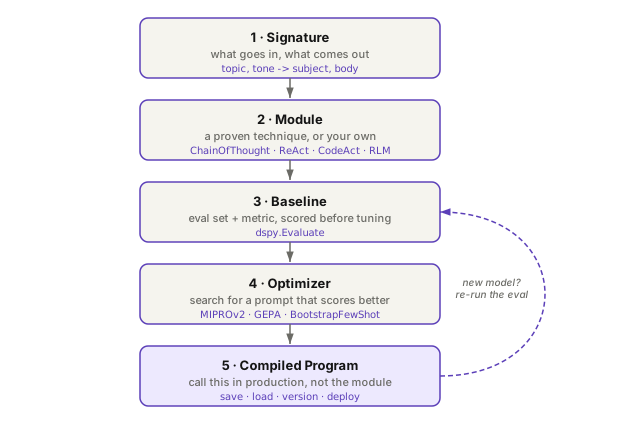
All of it rests on the first step. Declaring the task separates intent from implementation, and that separation is what makes modules swappable, optimization possible, and a model swap a config change. Go back to writing the prompt by hand and the rest stops working.
Declare, wrap, and optimize are three ideas. Running them is five concrete moves, and the order matters: you cannot tell whether an optimizer helped without the baseline you measured before it ran.
Where to start
Install DSPy with pip install dspy, then pick one LLM call in an existing project, ideally the one that breaks most often or the one you have re-tuned the most. Rewrite it as a Signature, wrap it in dspy.ChainOfThought, and run it. It is a single call site, so you can put it back if you do not like it.
If the result is promising, put together a spreadsheet with 10 to 15 representative inputs, varied along whatever actually changes the answer, and run an optimizer. That is where the payoff compounds: you move from "I think this prompt is good" to a score on an eval set that you can compare before and after a change. Once that feedback loop is running, improving your system becomes about adding rows to a spreadsheet, not rewriting prompts.
The companion repo for this post has all the code examples, including the without-DSPy and DSPy versions side by side, a sample eval spreadsheet, and the optimization script. It also carries a Claude agent skill, prompt-to-dspy, that does the first conversion for you: point it at a codebase and it finds the f-string prompts, works out the inputs, outputs, and intent of each one, proposes a Signature and a module, and lists the plumbing you can delete. Copy it into the .claude/skills/ of whatever project you are converting rather than installing it globally, since it is a migration tool and not something you need afterwards.
For everything else, the DSPy documentation is the reference. Compound AI's Separating Task from Model makes the architectural case underneath all of this: a task definition, the code that constrains it, and the eval that says what success means are the parts worth keeping stable, and the model is the part you should expect to replace.
comments