Building a Generative UI Agent for Bob, with Bob, by Bob
How I built a task-specific harness around Bob that generated, bundled, and sandboxed live UI apps for IBM Think 2026.
At IBM Think 2026, a visitor could come up with an idea, watch Bob plan and write the code, and see the app running on the booth screen two minutes later. IBM had just unveiled Bob, its new coding agent, at the keynote, and the booth was where conference visitors got to try it. Bob is built for complex enterprise development, and my job was to demonstrate those capabilities inside a strict two-minute window.
To deliver that, I built a generative UI agent for the booth. Visitors could describe an app from scratch, or pick an existing example and replay the flow.
This is generative UI in practice: software generated on demand, shaped entirely by a user's prompt rather than served from a pre-built library. It offers a glimpse of a future where interfaces are personalized and ephemeral, created in the moment of the visit to match a visitor's specific intent.
The experience ran on a task-specific harness I built around Bob. In agentic AI vocabulary, a harness covers everything except the model itself: the tools, prompts, modes, and the loop that runs them. Bob already has its native harness. The task-specific harness I added sits on top, wrapping Bob's open-ended generation in deterministic input, build, and render layers.
The experience was built for Bob, the harness that made it possible was built with Bob, and every app a visitor saw was authored by Bob. In the rest of this article, I will share how I designed the architecture to handle the booth constraints, what I learned from the execution, and where there is room for improvement.
Design goals
The loop had to complete while a visitor was still standing there. That single constraint gave the generative UI agent five design goals.
- Two-minute cycle. The system had to move from prompt to rendered UI in roughly two minutes. Anything longer would turn the experience from a live demo into a waiting screen.
- Predictable structure. Bob could generate the app, but the task-specific harness needed to know where the entry file lived, which files belonged to the app, and what to bundle. The output needed a known shape, not just a pile of generated files.
- Predictable dependencies. Generated code could only import what the host had already declared. Surprise modules at runtime would make the app harder to bundle, harder to debug, and harder to trust.
- Sandboxing. The generated app needed to render without sharing the host page's styles, globals, or storage surface. The harness had to let the code run while keeping it inside a controlled browser boundary.
- Iteration support. A visitor could ask for changes after the first render. Continuing the app needed to be a storage lookup against the same conversation workspace, not a fresh bootstrap from scratch.
Those goals shaped the task-specific harness around BobShell: a context builder to constrain Bob's input, a conversation workspace for predictable file structure, a BobShell subprocess for the generation step, an esbuild bundler for deterministic build, an HTML wrapper for safe import resolution, and a sandboxed iframe for isolation.
The task-specific harness
The generative UI agent is BobShell wrapped in a task-specific harness. The task-specific harness compressed Bob's coding-agent capability into a loop that could run in front of a visitor. Because Bob did not yet have an agent SDK, the task-specific harness invoked BobShell, Bob's CLI, as a non-interactive subprocess.
From there, the pipeline was straightforward: a prompt entered through the chat panel, the context builder assembled the right input, BobShell generated files, esbuild produced a browser-runnable bundle, and the host UI mounted the iframe preview.
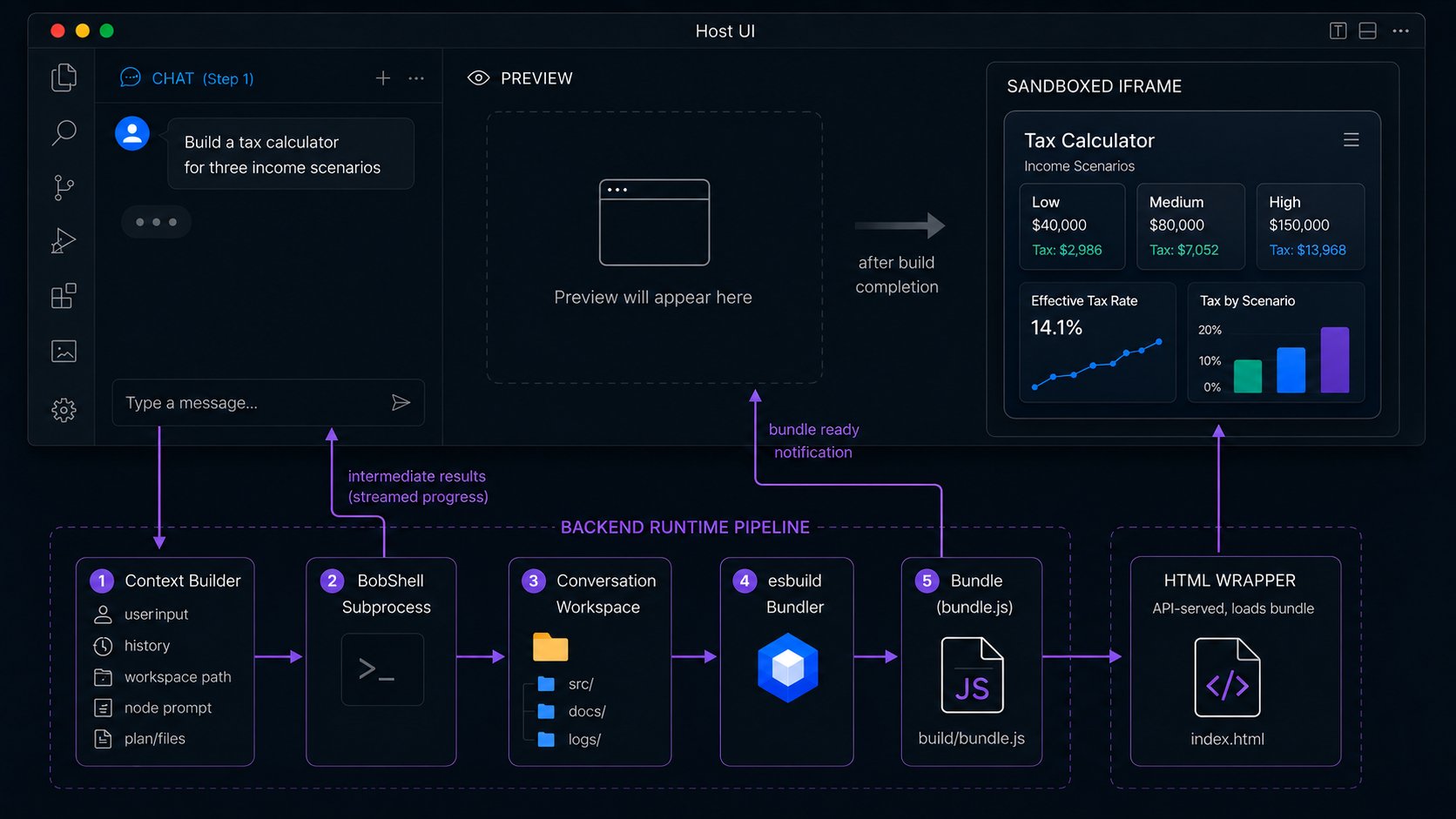
The harness separates four concerns: input, generation, bundling, and rendering.
1. Context Builder
The user prompt does not go straight to BobShell. It first passes through a context builder, a backend module that assembles the input BobShell needs for the current turn.
That input depends on mode. The user selects Plan mode or Code mode from the frontend, and the context builder assembles the matching prompt. The booth experience ran plan to code: a visitor generated a plan, approved it, then triggered Code mode.
In Plan mode, the prompt includes the user's request, the workspace path, and a custom instruction that asks Bob to produce a plan document with four sections:
1. Overview
   What the app should do and what experience it should create.

2. Architecture
   The high-level structure of the app.

3. Component breakdown
   The main UI components and what each one owns.

4. Manifest
   The file list, file roles, and entry point esbuild will use.
The planning prompt tells Bob to split larger apps into smaller files first, and the manifest then declares those files explicitly so the harness knows what to bundle.
Design Note: The 600-line limit. In testing, a single write_to_file call struggled once it grew past roughly 600 lines. That failure is why the manifest exists.
The manifest:
{
  "files": [
    { "path": "src/App.jsx",      "role": "entry",     "purpose": "..." },
    { "path": "src/Scenario.jsx", "role": "component", "purpose": "..." },
    { "path": "src/Summary.jsx",  "role": "component", "purpose": "..." }
  ],
  "entryPoint": "src/App.jsx"
}
The manifest is the interface between Bob's open-ended generation and the harness's deterministic build step. It gives both sides a shared file contract before code generation starts: Bob knows what to create, and esbuild knows where to start.
In Code mode, the prompt includes the approved plan, workspace path, conversation history, and any existing files in src/. That lets Bob edit in place during iteration rather than regenerate the app from scratch.
The Code-mode prompt also carries runtime constraints. Because the generated app runs inside an iframe, the prompt tells Bob not to assume access to the parent page, cookies, localStorage, or direct cross-origin APIs. The browser boundary becomes a generation constraint before Bob writes any code.
2. Conversation Workspace
Each session gets a conversation ID, and that ID owns the files Bob works with:
generated/conversations/{conversation_id}/
  src/    # source files Bob writes
  build/  # bundled output from esbuild
  logs/   # agent traces
  docs/   # plan documents
The workspace sits on a volume mount backed by object storage. A database would have been overkill for a handful of JSX and markdown files per conversation, and ephemeral Docker storage would have lost everything on container restart. The volume mount sits between those: files survive container restarts without requiring a schema layer.
The workspace also makes iteration cheap. When a visitor asks for a change, the harness reloads the workspace, sends Bob the plan and existing files, and lets Bob edit in place. Continuing becomes a storage lookup, not a full restart.
3. BobShell Subprocess
Once the context builder assembles the prompt, the harness launches BobShell as a non-interactive subprocess: one invocation per turn, prompt in, output out, wait for completion.
The command shape looked like this:
export BOBSHELL_API_KEY="your-api-key-here"

bob \
  --auth-method api-key \
  --chat-mode={mode} \
  --yolo \
  -p "{prompt}"
The {prompt} comes from the context builder. The {mode} comes from the user's selection in the frontend: usually plan or code, with room for custom modes.
In Node.js, the harness can spawn that command as a child process:
import { spawn } from "node:child_process";

type RunBobShellOptions = {
  mode: "plan" | "code" | string;
  prompt: string;
  apiKey: string;
  cwd: string;
  onStdout?: (chunk: string) => void;
  onStderr?: (chunk: string) => void;
};

export function runBobShell({
  mode,
  prompt,
  apiKey,
  cwd,
  onStdout,
  onStderr,
}: RunBobShellOptions): Promise<void> {
  return new Promise((resolve, reject) => {
    const child = spawn(
      "bob",
      [
        "--auth-method",
        "api-key",
        `--chat-mode=${mode}`,
        "--yolo",
        "-p",
        prompt,
      ],
      {
        cwd,
        env: {
          ...process.env,
          BOBSHELL_API_KEY: apiKey,
        },
        stdio: ["ignore", "pipe", "pipe"],
      }
    );

    child.stdout.setEncoding("utf8");
    child.stderr.setEncoding("utf8");

    child.stdout.on("data", (chunk) => {
      onStdout?.(chunk);
    });

    child.stderr.on("data", (chunk) => {
      onStderr?.(chunk);
    });

    child.on("error", reject);

    child.on("close", (code) => {
      if (code === 0) {
        resolve();
        return;
      }

      reject(new Error(`BobShell exited with code ${code}`));
    });
  });
}
The trick is operational: the Node.js process must run somewhere bob is installed and available on PATH. In this implementation, the backend ran inside a container image that already had BobShell installed. Without that, spawn("bob", ...) fails before Bob receives the prompt.
The --yolo flag deserves explicit framing. It auto-approves tool calls, which removed the human-in-loop step that would have blown the booth's time budget. The flag was acceptable here only because the agent ran in a scoped workspace inside a sandboxed preview. In ordinary development, where the agent has access to your real environment, this flag is a security risk and I would not use it.
While BobShell runs, the harness parses its output and streams intermediate results back to the chat panel through Server-Sent Events. The visitor sees progress instead of staring at an empty preview.
We tried staged generation: skeleton first, then components, so the visitor would see partial output as soon as Bob started writing. It looked useful for live UX, but the bundler cannot tell a partially written file from a complete one. Detecting incompleteness added complexity, and waiting for completion added latency.
For this version, single-shot generation won. Bob writes the app in one Code-mode run, then the backend bundles after BobShell exits.
4. esbuild Bundler
After BobShell finishes, the files in src/ still need to become something the browser can run. esbuild handles that bundling step.
The first version ran esbuild-wasm inside the iframe so the bundle could be built in the browser, near the render. CSP rules in the host environment made that path awkward: the iframe could not reliably load the WASM module under the security headers we needed.
Moving esbuild to the server simplified the harness. BobShell writes files, exits, and the backend runs esbuild against the manifest's entry point:
await esbuild.build({
  entryPoints: [`${workspace}/${plan.entryPoint}`],
  outfile:     `${workspace}/build/bundle.js`,
  bundle:      true,
  format:      "esm",
  jsx:         "automatic",
  external:    ["react", "react-dom/client"],
});
React and react-dom/client stay external, so the generated bundle does not ship its own copy. Instead, the HTML wrapper declares an import map, and the browser resolves those imports at load time. That keeps the bundle small enough to load quickly on the booth display, and gives the host control over which React version the generated app runs against.
The cost is feedback. Because bundling happens after BobShell exits, Bob does not see build errors. If esbuild fails, the backend reports it to the host UI, but Bob cannot read the diagnostic and patch the files in the same turn.
5. Bundle
The bundle is the handoff artifact:
build/bundle.jsIt is the generated app after the backend has turned Bob's source files into browser-runnable JavaScript.
The host UI does not mount the preview just because Bob wrote files. It mounts after the backend produces the bundle and sends a bundle-ready notification. The bundle is the artifact; the notification tells the preview area to load the iframe.
6. HTML Wrapper
The iframe does not load bundle.js directly. It loads an API-served HTML wrapper.
The host UI points the iframe's src at an API endpoint for the conversation. That endpoint returns a small HTML document with four jobs: declare the import map, load Tailwind for this version, load the error bridge, and import the generated bundle.
<!DOCTYPE html>
<html>
  <head>
    <script type="importmap">
      {
        "imports": {
          "react": "https://esm.sh/react@19",
          "react-dom/client": "https://esm.sh/react-dom@19/client"
        }
      }
    </script>
    <script src="https://cdn.tailwindcss.com"></script>
    <script src="/runtime/error-bridge.js"></script>
  </head>
  <body>
    <div id="root"></div>
    <script
      type="module"
      src="/api/conversations/{id}/build/bundle.js">
    </script>
  </body>
</html>
The import map controls module resolution for external imports like react and react-dom/client. Tailwind is different: it loads as a script tag in this implementation because import maps do not govern ordinary script URLs.
That Tailwind choice was pragmatic. Bob writes clean Tailwind classes, and utility-class strings are compact in prompts. A production version should generate Tailwind CSS server-side rather than depend on the browser CDN.
The HTML wrapper belongs to the render path, not the backend pipeline. After the backend produces the bundle, the preview receives a bundle-ready notification. The iframe then loads the wrapper, which loads the bundle.
7. Sandboxed iframe preview
The first version rendered generated components directly inside the host page. That put the generated app in the same DOM, CSS cascade, and JavaScript surface as the product UI. A bad selector could restyle the host, and generated code could overwrite assumptions the host depended on.
The harness needed to isolate generated code, styles, build output, and failures. A bundling error should stop the preview, not the host UI. A script error in the generated bundle should be reported by the preview, not treated as a product-shell crash.
The second version moved the generated app into an iframe. We considered web components with Shadow DOM, but Shadow DOM only isolates DOM and CSS. It does not create a separate JavaScript execution environment. With sandbox="allow-scripts allow-forms", the iframe gives the preview its own browser boundary for scripts, styles, storage, and execution failures.
That boundary shapes prompt design too. Bob is told to keep state in memory, avoid cross-origin fetches, and not assume access to the parent page. If the generated app needs to report status outward, it crosses a narrow bridge.
The bridge uses postMessage for two states: the wrapper finished loading, or the generated app hit an execution error. The host listens for both and updates the chat or preview panel without exposing the rest of the product to the generated app.
// Inside the wrapper, before the bundle loads
window.addEventListener("load", () => {
  parent.postMessage({
    type: "generated-app-loaded",
  }, "*");
});

window.addEventListener("error", (event) => {
  parent.postMessage({
    type:    "generated-app-error",
    message: event.message,
    source:  event.filename,
    line:    event.lineno,
  }, "*");
});

// On the host side
function PreviewPane({ previewUrl }: { previewUrl: string }) {
  useEffect(() => {
    const handleMessage = (event: MessageEvent) => {
      if (event.data?.type === "generated-app-loaded") {
        markPreviewReady();
      }
      if (event.data?.type === "generated-app-error") {
        showRuntimeError(event.data);
      }
    };
    window.addEventListener("message", handleMessage);
    return () => window.removeEventListener("message", handleMessage);
  }, []);

  return (
    <iframe
      src={previewUrl}
      sandbox="allow-scripts allow-forms"
      title="Generated app preview"
    />
  );
}
Lessons and next steps
The Think 2026 implementation made one thing clear: Bob already has the primitives. It reads and writes files, runs commands, and generates working React and Tailwind. The work was in the task-specific harness: pointing those primitives at a predictable flow, where to write, what context to use, when to bundle, and where to render.
Without that harness, the output is code in a folder. With it, the visitor gets a browser-runnable app to test.
The first improvement is prompt and harness efficiency. Every second matters in a booth, and every token and setup step has a cost in production. The goal is to design the prompt, context, tools, and workflow so Bob reaches a useful result faster. Interactive BobShell could help: a warm session across turns reduces latency while the harness keeps controlling workspace and output shape.
The second improvement is to put the build step, linting, and security scanning inside the same Bob loop. We had this and removed it for latency, since Bob writes compilable code in one pass often enough to skip validation. Once the first improvement frees up time budget, validation comes back: Bob runs esbuild and the scanners, reads diagnostics, patches the offending file, and retries before the preview reaches the user.
The third improvement is the approved frontend surface. The current harness exposed only React and Tailwind to generated code. A polished version should add richer approved ESM modules, including something like Carbon React, so generated apps do not make Bob recreate every UI primitive.
The Think 2026 version proved the core loop: prompt, context, BobShell, workspace, bundle, wrapper, iframe. The next version should make it more self-correcting, safer, and more efficient.
Bob brings the coding agent. The task-specific harness gives it a job.
The views in this essay are personal. They do not represent IBM, the Bob team, or any of my employers.
comments